Flutter: the Android keyboard won’t open on a field with an iOS-only TextInputAction
A TextField with TextInputAction.join works on iOS. In a debug build on Android, tapping it gives the field focus and nothing else: no keyboard, no cursor, and nothing in logcat. The release build of the same code is fine. It looks like a broken emulator keyboard and it is one line of Dart.
The Flutter login screens from this tutorial run on both platforms from one codebase. A text field’s textInputAction sets the label on the keyboard’s action key, and iOS has a few labels Android does not. Using one of them is easy to do and hard to notice.
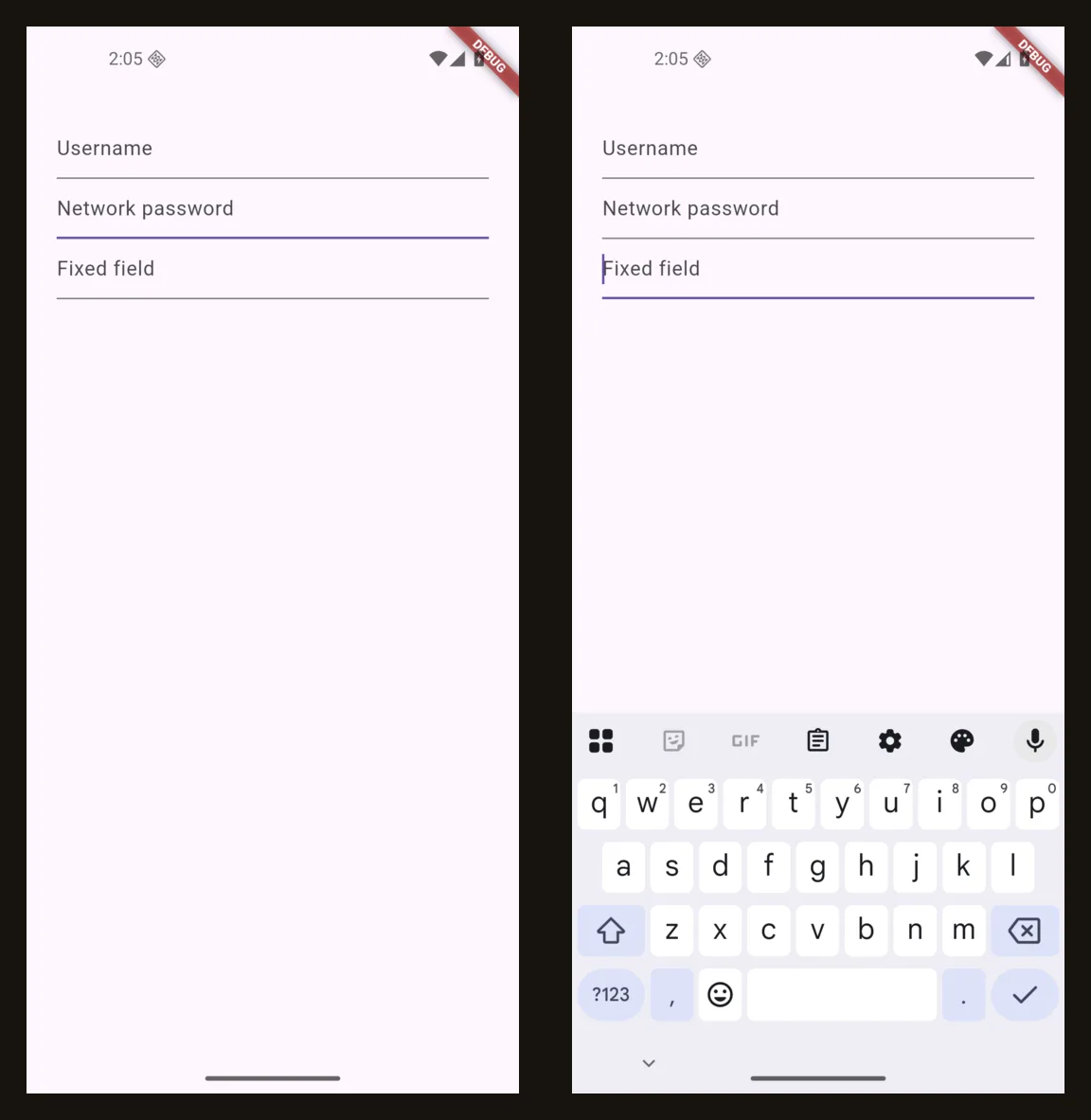
What it looks like
TextField(
  decoration: const InputDecoration(hintText: 'Network password'),
  textInputAction: TextInputAction.join,
  onSubmitted: (value) => join(value),
)
On iOS the return key reads “Join”. On Android, in a debug build:
- Tapping the field moves the focus to it. The underline changes colour.
- The keyboard does not appear and there is no cursor.
- Text sent with
adb shell input text abcdoes not arrive in the field. - Every other field on the screen works.
adb logcatshows no error.
The first three are what a misbehaving emulator keyboard looks like, which is where the time goes: restarting the emulator, clearing Gboard’s data, switching system images. The fourth is the clue. If one field is dead and its neighbours are not, compare the fields.
The cause
Flutter keeps a list of the actions each platform’s keyboard has, and checks it when a field connects to the keyboard. From text_input.dart in Flutter 3.47:
static const List<TextInputAction> _androidSupportedInputActions = <TextInputAction>[
  TextInputAction.none,
  TextInputAction.unspecified,
  TextInputAction.done,
  TextInputAction.send,
  TextInputAction.go,
  TextInputAction.search,
  TextInputAction.next,
  TextInputAction.previous,
  TextInputAction.newline,
];

void _attach(TextInputConnection connection, TextInputConfiguration configuration) {
  assert(_debugEnsureInputActionWorksOnPlatform(configuration.inputAction));
  _currentConnection = connection;
  // ...
}
join is not in the Android list, so the assert throws before the connection to the keyboard is made. The field already has focus by then. The focus change succeeded, the keyboard request did not, and the field is left in between.
| Works on both | iOS only | Android only |
|---|---|---|
unspecified, done, go, search, send, next, newline |
continueAction, join, route, emergencyCall |
none, previous |
The same check runs on iOS with its own list, so TextInputAction.previous or none on an iPhone fails the same way.
Why nothing reports it
The assertion is reported like any other framework error. Whether you see it depends on how the app was started.
With flutter run attached, the console prints it once, between lines of device log:
══╡ EXCEPTION CAUGHT BY FOUNDATION LIBRARY ╞════════════════════════════════════
The following assertion was thrown while dispatching notifications for FocusNode:
The requested TextInputAction "TextInputAction.join" is not supported on Android.
'package:flutter/src/services/text_input.dart':
Failed assertion: line 2118 pos 11: '_androidSupportedInputActions.contains(inputAction)'
Started any other way, the same debug build says nothing. Installed as an APK and opened from the launcher or with adb shell am start, it wrote no line to adb logcat when the field was tapped, on the first tap or the second. That is how a tester’s device, a CI emulator or a screenshot script runs it.
Nothing warns earlier either. flutter analyze has no complaint about the line, and a widget test does not catch it:
testWidgets('join field takes text with the platform set to Android', (tester) async {
  debugDefaultTargetPlatformOverride = TargetPlatform.android;
  await tester.pumpWidget(const MaterialApp(
    home: Scaffold(body: TextField(textInputAction: TextInputAction.join)),
  ));
  await tester.tap(find.byType(TextField));
  await tester.pump();
  await tester.enterText(find.byType(TextField), 'abc');
  expect(find.text('abc'), findsOneWidget);
  debugDefaultTargetPlatformOverride = null;
});
That passes. The check uses Platform.isAndroid from dart:io, which is the machine running the test, and debugDefaultTargetPlatformOverride does not change it. On a Mac or a Linux CI runner neither branch of the check applies.
Release builds hide it
An assert is removed from release builds. There the unsupported action is sent to Android as “unspecified” and the keyboard opens:
| Field | Debug build | Release build |
|---|---|---|
TextInputAction.next |
keyboard opens, action key is Next | same |
TextInputAction.join |
no keyboard | keyboard opens, action key is Android’s default |
TextInputAction.done |
keyboard opens, action key is Done | same |
Pressing the action key on the join field in the release build still calls onSubmitted. So the app in the store works, the app on the developer’s own emulator does not, and anyone testing a debug build reports a bug that “can’t be reproduced” in production.
The fix
Choose the action by platform:
/// "Join" on iOS, where the keyboard has that key. "Done" everywhere else.
TextInputAction get joinAction =>
    defaultTargetPlatform == TargetPlatform.iOS ? TextInputAction.join : TextInputAction.done;

TextField(
  decoration: const InputDecoration(hintText: 'Network password'),
  textInputAction: joinAction,
  onSubmitted: (value) => join(value),
)
defaultTargetPlatform comes from package:flutter/foundation.dart and needs no dart:io import, so the same file still compiles for the web. With that change the field opens the keyboard in both builds and the key reads Done.
Checking the keyboard from the command line
Two commands tell a Flutter problem from an emulator problem without looking at the screen:
adb shell dumpsys input_method | grep -o -m1 "mInputShown=[a-z]*"
adb shell dumpsys input_method | grep -o -m1 "inputType=0x[0-9a-f]* imeOptions=0x[0-9a-f]*"
mInputShown=true
inputType=0x8001 imeOptions=0x2000006
mInputShown is whether the keyboard is up. The last digit of imeOptions is the action the field asked for: 5 is Next, 6 is Done, 0 is unspecified. On the dead field they read mInputShown=false and inputType=0x0 imeOptions=0x0, because no connection to the keyboard was made. A keyboard that is broken at the system level fails for every field in every app, so tap a field in Settings before blaming the emulator.
To get the error into logcat for builds that are not started with flutter run, print it yourself:
void main() {
  FlutterError.onError = (details) {
    FlutterError.presentError(details);   // keep the normal console output
    debugPrint('FlutterError: ${details.exceptionAsString()}');
  };
  runApp(const MyApp());
}
With that in place the tap logs The requested TextInputAction "TextInputAction.join" is not supported on Android. to adb logcat under the flutter tag.
