Flutter Login and Signup Screen tutorial: iOS + Android + PHP 8 + Biometrics
A Flutter app for iOS and Android with signup, login, logout and Face ID or fingerprint unlock, talking to a PHP 8 API. The session token goes in the Keychain or the Android Keystore, and the forms work with password AutoFill on both platforms.
This is the Flutter version of the SwiftUI login and signup tutorial. It uses the same PHP API, unchanged, so the server side of that post applies here too. This post is about the app.
The full project is on GitHub: dipinkrishna/flutter-login-signup-2026. It has the Flutter app, the PHP API and the SQL schema.
Packages
Three packages do the work:
dependencies:
  flutter:
    sdk: flutter
  http: ^1.6.0
  flutter_secure_storage: ^11.1.1
  local_auth: ^3.0.2
httptalks to the API.flutter_secure_storagekeeps the session token in the Keychain on iOS and in storage encrypted with a Keystore key on Android.local_authshows the Face ID or fingerprint prompt.
The API
The API has four routes:
| Method | Path | Sends | Returns |
|---|---|---|---|
| POST | /signup |
username, password | 201 with a token and the user |
| POST | /login |
username, password | 200 with a token and the user |
| GET | /me |
Authorization: Bearer <token> |
200 with the user |
| POST | /logout |
Authorization: Bearer <token> |
204 |
Errors come back as {"error": "..."} with a 4xx status. Passwords are hashed with password_hash(), the database only stores a hash of each token, and five failed logins lock that username for 15 minutes. The SwiftUI post walks through the PHP code.
Start it from the repository root. Use 0.0.0.0 rather than 127.0.0.1, so the Android emulator can reach it:
DB_PASSWORD=choose-a-password php -S 0.0.0.0:8080 -t api/public api/public/index.php
The emulator sees your computer at 10.0.2.2, and the iOS simulator at 127.0.0.1, so the app picks the address by platform:
final Uri apiBaseUrl = Uri.parse(
  const String.fromEnvironment('API_BASE_URL').isNotEmpty
      ? const String.fromEnvironment('API_BASE_URL')
      : Platform.isAndroid
      ? 'http://10.0.2.2:8080'
      : 'http://127.0.0.1:8080',
);
For a real server, run with --dart-define=API_BASE_URL=https://api.example.com.
Talking to the API
AuthApi wraps the four routes. Every request goes through one method that sends JSON, adds the token, and turns every kind of failure into an AuthException with a message the screens can show:
Future<Map<String, dynamic>> _send(
  String method,
  String path, {
  Map<String, String>? body,
  String? token,
  Duration timeout = const Duration(seconds: 30),
}) async {
  final base = baseUrl.toString().replaceAll(RegExp(r'/+$'), '');
  final request = http.Request(method, Uri.parse('$base/$path'))
    ..headers['Accept'] = 'application/json';

  if (body != null) {
    request.headers['Content-Type'] = 'application/json';
    request.body = jsonEncode(body);
  }
  if (token != null) {
    request.headers['Authorization'] = 'Bearer $token';
  }

  final http.Response response;
  try {
    final streamed = await _client.send(request).timeout(timeout);
    response = await http.Response.fromStream(streamed);
  } on IOException {
    throw _networkError;
  } on TimeoutException {
    throw _networkError;
  } on http.ClientException {
    throw _networkError;
  }

  final status = response.statusCode;
  final decoded = _decode(response.body);

  if (status >= 200 && status < 300) {
    return decoded is Map<String, dynamic> ? decoded : const {};
  }
  if (status == 401 && token != null) {
    throw const AuthException('Please log in again.', unauthorized: true);
  }
  final error = decoded is Map<String, dynamic> ? decoded['error'] : null;
  throw AuthException(
    error is String ? error : 'Something went wrong (HTTP $status).',
  );
}
AuthApi takes an optional http.Client, which makes it easy to test with MockClient from package:http/testing.dart. The repo has tests for the JSON body, the Bearer header, error messages, 401s and network failures.
Keeping the token safe
TokenStore is a thin wrapper around flutter_secure_storage. It holds the token and the “unlock with biometrics” setting:
class TokenStore {
  TokenStore({FlutterSecureStorage? storage})
    : _storage =
          storage ??
          const FlutterSecureStorage(
            iOptions: IOSOptions(
              accessibility: KeychainAccessibility.first_unlock_this_device,
            ),
          );

  final FlutterSecureStorage _storage;

  static const _tokenKey = 'session_token';
  static const _biometricKey = 'biometric_unlock';

  Future<String?> readToken() => _storage.read(key: _tokenKey);

  Future<void> saveToken(String token) =>
      _storage.write(key: _tokenKey, value: token);

  /// Whether the app should ask for biometrics before opening the session.
  Future<bool> get biometricUnlockEnabled async =>
      await _storage.read(key: _biometricKey) == 'on';

  Future<void> setBiometricUnlock(bool enabled) =>
      _storage.write(key: _biometricKey, value: enabled ? 'on' : null);

  Future<void> clear() async {
    await _storage.delete(key: _tokenKey);
    await _storage.delete(key: _biometricKey);
  }
}
first_unlock_this_device keeps the token out of iCloud Keychain and device backups on iOS. On Android, set android:allowBackup="false" too: a restored backup can’t decrypt the storage anyway, because the Keystore key doesn’t move with it.
Biometric unlock
Biometrics wraps local_auth. A cancelled or failed prompt returns false, so the app can stay on the locked screen. Anything worse, like biometrics removed from the device, throws:
Future<bool> authenticate(String reason) async {
  try {
    return await _auth.authenticate(
      localizedReason: reason,
      biometricOnly: true,
      persistAcrossBackgrounding: true,
    );
  } on LocalAuthException catch (e) {
    switch (e.code) {
      case LocalAuthExceptionCode.userCanceled ||
          LocalAuthExceptionCode.systemCanceled ||
          LocalAuthExceptionCode.timeout ||
          LocalAuthExceptionCode.temporaryLockout ||
          LocalAuthExceptionCode.authInProgress:
        return false;
      default:
        rethrow;
    }
  }
}
Session holds the app’s state. At launch it looks for a saved token. With biometric unlock on, it shows the Locked screen and doesn’t touch the API until the prompt succeeds:
Future<void> start() async {
  _biometryName = await _biometrics.name();

  final token = await _tokens.readToken();
  if (token == null) {
    _set(const SignedOut());
    return;
  }

  _biometricUnlockEnabled = await _tokens.biometricUnlockEnabled;
  if (_biometricUnlockEnabled) {
    _set(const Locked());
  } else {
    await _restore(token);
  }
}

Future<void> unlock() async {
  final bool passed;
  try {
    passed = await _biometrics.authenticate('Unlock your account');
  } on Exception {
    // Biometrics can't be used any more (removed, or locked out), so fall
    // back to the password.
    await signOutLocally();
    return;
  }
  if (!passed) return; // Stay on the locked screen so they can try again.

  final token = await _tokens.readToken();
  if (token == null) {
    await signOutLocally();
  } else {
    await _restore(token);
  }
}
This is a check inside the app. The token itself is encrypted by the platform, but reading it doesn’t require biometrics, the way the SwiftUI version’s Keychain item does. flutter_secure_storage can go further: AndroidOptions.biometric() ties the Android key to biometrics, and IOSOptions takes accessControlFlags. If you use those, the storage shows its own prompt when you read the token, so drop the separate local_auth step or you’ll ask twice.
The screens
main.dart shows the screen that matches the session state. The states are a sealed class, so the switch has to cover every one:
home: ListenableBuilder(
  listenable: session,
  builder: (context, _) => switch (session.state) {
    Starting() => const Scaffold(
      body: Center(child: CircularProgressIndicator()),
    ),
    SignedOut() => LoginScreen(session: session),
    Locked() => LockedScreen(session: session),
    Unreachable() => UnreachableScreen(session: session),
    SignedIn(:final user) => HomeScreen(session: session, user: user),
  },
),
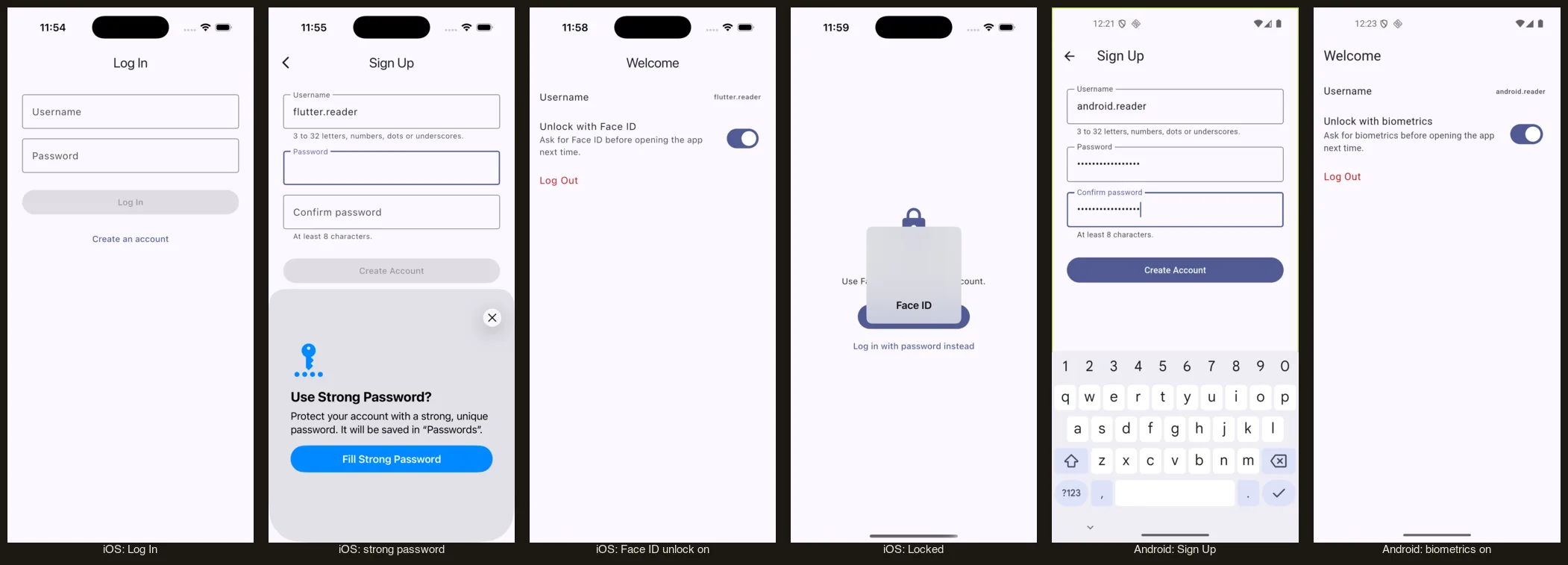
For password AutoFill, wrap the fields in an AutofillGroup and give each one autofillHints. On Sign Up both password fields use newPassword, so iOS offers to create a strong password:
AutofillGroup(
  child: Column(
    children: [
      TextField(
        controller: _username,
        autofillHints: const [AutofillHints.username],
        autocorrect: false,
        enableSuggestions: false,
        textInputAction: TextInputAction.next,
      ),
      TextField(
        controller: _password,
        obscureText: true,
        autofillHints: const [AutofillHints.newPassword],
        textInputAction: TextInputAction.next,
      ),
      TextField(
        controller: _confirmation,
        obscureText: true,
        autofillHints: const [AutofillHints.newPassword],
        textInputAction: TextInputAction.done,
      ),
    ],
  ),
),
The group asks the system to save the password when it goes away, which is right after a successful login.
textInputAction has to be an action the platform supports. TextInputAction.join is iOS-only: on Android, Flutter rejects it when it connects the field to the keyboard, and the keyboard never opens for that field. done, next and go work on both platforms.
After a successful signup, the session switches to signed in and the home screen appears under the Sign Up route, so Sign Up closes itself:
await widget.session.signUp(_username.text, _password.text);
navigator.popUntil((route) => route.isFirst);
Platform setup
Android. local_auth needs a FragmentActivity:
import io.flutter.embedding.android.FlutterFragmentActivity

// local_auth shows the biometric prompt from a FragmentActivity.
class MainActivity : FlutterFragmentActivity()
In AndroidManifest.xml, add the permission and turn off backups:
<uses-permission android:name="android.permission.USE_BIOMETRIC"/>

<application
    android:label="Login Signup"
    android:allowBackup="false"
    ...>
Change LaunchTheme in styles.xml to an AppCompat parent such as Theme.AppCompat.Light.NoActionBar. local_auth needs that on Android 8 and older.
Android blocks plain HTTP by default. For the local API, allow it in debug builds only, with android/app/src/debug/res/xml/network_security_config.xml:
<network-security-config>
    <domain-config cleartextTrafficPermitted="true">
        <domain includeSubdomains="false">10.0.2.2</domain>
        <domain includeSubdomains="false">localhost</domain>
        <domain includeSubdomains="false">127.0.0.1</domain>
    </domain-config>
</network-security-config>
Point to it from the debug AndroidManifest.xml with <application android:networkSecurityConfig="@xml/network_security_config"/>. Release builds stay HTTPS-only.
iOS. Add a Face ID usage string and allow local HTTP in Info.plist:
<key>NSFaceIDUsageDescription</key>
<string>Face ID keeps your account locked until you open the app.</string>
<key>NSAppTransportSecurity</key>
<dict>
    <key>NSAllowsLocalNetworking</key>
    <true/>
</dict>
On Android the setting reads “Unlock with biometrics” rather than “fingerprint”. getAvailableBiometrics() reports the strength class (strong or weak) there, not the sensor type, so the app uses a generic name.
Both prompts can be answered from a script, with no taps: see Test Face ID in the iOS Simulator from the command line and Test fingerprint login in the Android emulator from the command line.
Hope it helps!
