iOS Login and Signup Screen tutorial: SwiftUI + iOS 26 + PHP 8 + Face ID
Eleven years after the Swift 2 version, here is the login and signup tutorial again: SwiftUI screens, async/await networking, the session token in the Keychain, Face ID unlock, and a PHP 8 API that stores passwords and tokens the way they should be stored.
The app has four screens: Log In, Sign Up, Welcome, and a Locked screen that asks for Face ID before it opens a saved session. Behind it is a small JSON API in PHP with a MySQL database.
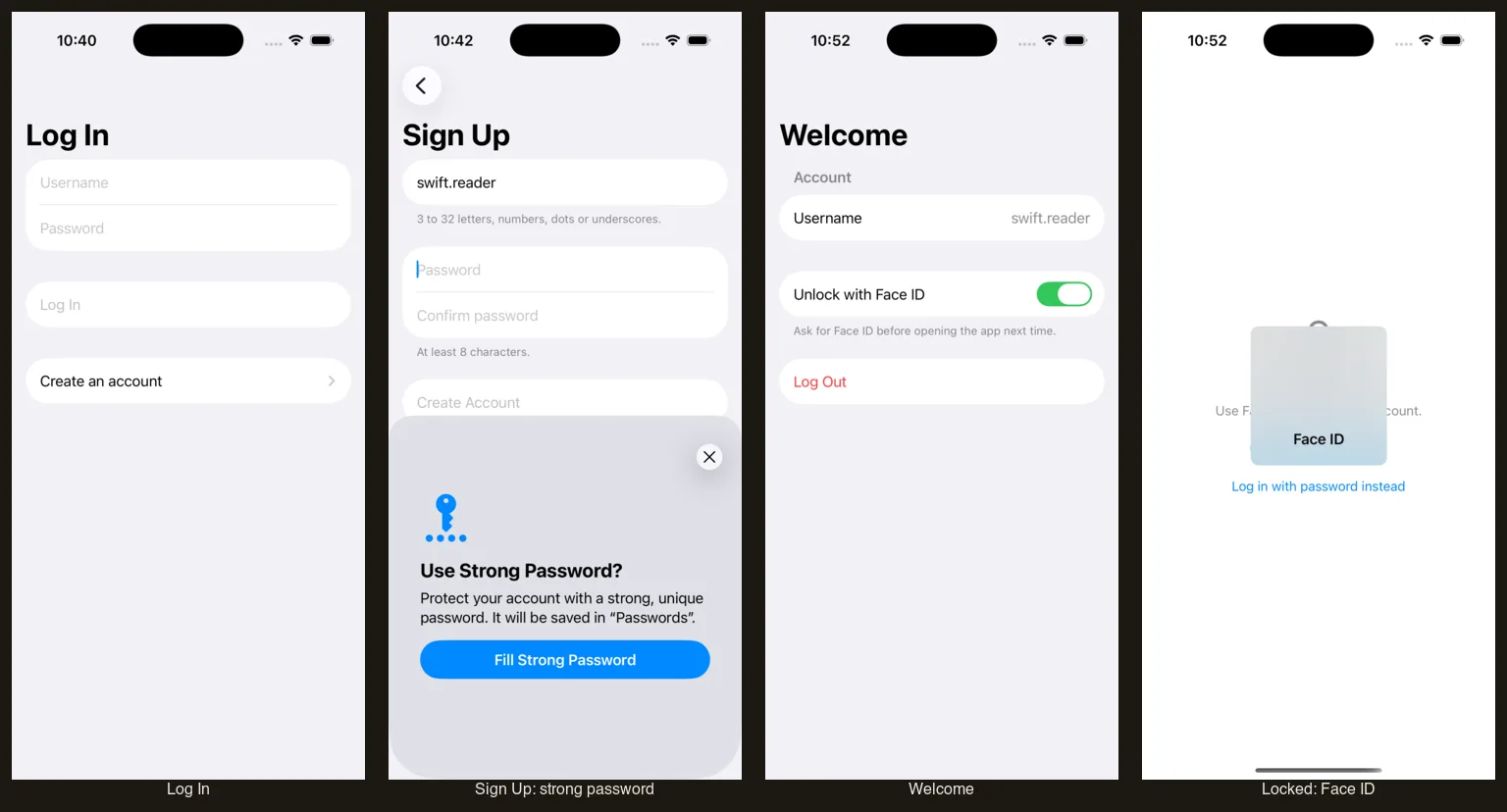
The full project is on GitHub: dipinkrishna/swiftui-login-signup-2026. It has the Xcode project, the PHP API and the SQL schema, so there’s no zip to download.
There is also a Flutter version for iOS and Android that uses the same API.
What’s different from the 2015 version
The old app posted the username and password as a form, waited on a synchronous NSURLConnection, read "success": 1 out of the JSON, and remembered the login with an ISLOGGEDIN flag in NSUserDefaults. None of that holds up today:
- The app now sends JSON with
URLSessionandasync/await, and the server answers with real HTTP status codes. - A login returns a random session token. The app keeps it in the Keychain, and every request after that sends it as a
Bearerheader. - The server stores passwords with
password_hash()and only ever stores a hash of each token. - Face ID can lock the saved session, so opening the app isn’t enough to get in.
The database
Three tables: users, sessions and failed login attempts.
CREATE TABLE users (
    id            INT UNSIGNED NOT NULL AUTO_INCREMENT,
    username      VARCHAR(32)  NOT NULL,
    password_hash VARCHAR(255) NOT NULL,
    created_at    DATETIME     NOT NULL DEFAULT CURRENT_TIMESTAMP,
    PRIMARY KEY (id),
    UNIQUE KEY users_username (username)
) ENGINE=InnoDB DEFAULT CHARSET=utf8mb4 COLLATE=utf8mb4_unicode_ci;

-- One row per logged-in device. Only a SHA-256 hash of the token is stored, so
-- a copy of this table can't be used to log in.
CREATE TABLE sessions (
    id         INT UNSIGNED NOT NULL AUTO_INCREMENT,
    user_id    INT UNSIGNED NOT NULL,
    token_hash CHAR(64)     NOT NULL,
    created_at DATETIME     NOT NULL DEFAULT CURRENT_TIMESTAMP,
    expires_at DATETIME     NOT NULL,
    PRIMARY KEY (id),
    UNIQUE KEY sessions_token_hash (token_hash),
    KEY sessions_user (user_id),
    CONSTRAINT sessions_user_fk FOREIGN KEY (user_id) REFERENCES users (id) ON DELETE CASCADE
) ENGINE=InnoDB DEFAULT CHARSET=utf8mb4 COLLATE=utf8mb4_unicode_ci;
The utf8mb4_unicode_ci collation is case-insensitive, so the unique index also stops someone signing up as “Dipin” when “dipin” exists. login_attempts is in api/schema.sql in the repo.
The API
Everything is in api/public/index.php, about 200 lines. There are four routes:
| Method | Path | Sends | Returns |
|---|---|---|---|
| POST | /signup |
username, password | 201 with a token and the user |
| POST | /login |
username, password | 200 with a token and the user |
| GET | /me |
Authorization: Bearer <token> |
200 with the user |
| POST | /logout |
Authorization: Bearer <token> |
204 |
Errors come back as {"error": "..."} with a 4xx status, and the message is written to be shown to the user as-is.
Signing up validates the input, hashes the password and relies on the unique index to catch a taken username:
function signup(PDO $pdo, array $config): never
{
    ['username' => $username, 'password' => $password] = credentials();

    if (!preg_match(USERNAME_PATTERN, $username)) {
        respond(422, ['error' => 'Usernames are 3 to 32 letters, numbers, dots or underscores.']);
    }
    if (mb_strlen($password) < 8) {
        respond(422, ['error' => 'Passwords need at least 8 characters.']);
    }
    // bcrypt, PHP's default algorithm, ignores everything after the first 72 bytes.
    if (strlen($password) > 72) {
        respond(422, ['error' => 'Passwords can be at most 72 characters.']);
    }

    try {
        $pdo->prepare('INSERT INTO users (username, password_hash) VALUES (?, ?)')
            ->execute([$username, password_hash($password, PASSWORD_DEFAULT)]);
    } catch (PDOException $e) {
        // 1062 is MySQL's duplicate key error, from the unique index on username.
        if (($e->errorInfo[1] ?? null) === 1062) {
            respond(409, ['error' => 'That username is taken.']);
        }
        throw $e;
    }

    respond(201, startSession($pdo, $config, (int) $pdo->lastInsertId(), $username));
}
Catching error 1062 specifically matters. The 2015 script reported “username already exists” for any database error, which sent more than one reader hunting for a duplicate that wasn’t there.
Logging in checks recent failures first, then the password:
    if (recentFailures($pdo, $config, $username, $ip) >= $config['max_failed_logins']) {
        respond(429, ['error' => 'Too many failed attempts. Please wait a few minutes and try again.']);
    }

    $stmt = $pdo->prepare('SELECT id, username, password_hash FROM users WHERE username = ?');
    $stmt->execute([$username]);
    $user = $stmt->fetch() ?: null;

    // Check against a throwaway hash when there's no such user, so a wrong
    // username and a wrong password take about as long to answer.
    $hash = $user['password_hash'] ?? password_hash('no such user', PASSWORD_DEFAULT);

    if (!password_verify($password, $hash) || $user === null) {
        $pdo->prepare('INSERT INTO login_attempts (username, ip) VALUES (?, ?)')
            ->execute([$username, $ip]);
        respond(401, ['error' => 'Wrong username or password.']);
    }
After five failures for the same username from the same IP address, even the right password gets a 429 for 15 minutes. That slows down someone guessing at one account. It won’t stop a spread-out attack from many addresses, which is a job for the web server or a firewall in front of it.
A successful login or signup creates a session:
function startSession(PDO $pdo, array $config, int $userId, string $username): array
{
    $pdo->exec('DELETE FROM sessions WHERE expires_at < NOW()');

    $token = bin2hex(random_bytes(32));
    $pdo->prepare('INSERT INTO sessions (user_id, token_hash, expires_at) VALUES (?, ?, NOW() + INTERVAL ? DAY)')
        ->execute([$userId, hash('sha256', $token), $config['session_days']]);

    return ['token' => $token, 'user' => ['id' => $userId, 'username' => $username]];
}
The token goes to the app once. The database keeps only its SHA-256 hash, so /me and /logout hash the incoming token and look that up.
To run it, create the database and a user, load api/schema.sql, and start PHP’s built-in server from the repository root:
DB_PASSWORD=choose-a-password php -S 127.0.0.1:8080 -t api/public api/public/index.php
The README has the SQL for the database and user. On Apache, point the document root at api/public; the .htaccess there routes requests to index.php and passes the Authorization header through.
Talking to the API
AuthAPI wraps the four routes. Every request goes through one function that sets the headers, sends the body as JSON and turns a failure into an error the screens can show:
private func send(
    _ path: String,
    method: String = "POST",
    body: Credentials? = nil,
    token: String? = nil,
    timeout: TimeInterval = 30
) async throws -> Data {
    var request = URLRequest(url: baseURL.appending(path: path), timeoutInterval: timeout)
    request.httpMethod = method
    request.setValue("application/json", forHTTPHeaderField: "Accept")

    if let body {
        request.setValue("application/json", forHTTPHeaderField: "Content-Type")
        request.httpBody = try JSONEncoder().encode(body)
    }
    if let token {
        request.setValue("Bearer \(token)", forHTTPHeaderField: "Authorization")
    }

    let result: (Data, URLResponse)
    do {
        result = try await URLSession.shared.data(for: request)
    } catch {
        throw AuthError.network
    }

    let (data, response) = result
    let status = (response as? HTTPURLResponse)?.statusCode ?? 0

    if (200..<300).contains(status) {
        return data
    }
    if status == 401 && token != nil {
        throw AuthError.unauthorized
    }
    let message = (try? JSONDecoder().decode(ErrorResponse.self, from: data))?.error
    throw AuthError.server(message ?? "Something went wrong (HTTP \(status)).")
}
The app points at http://127.0.0.1:8080, which reaches your Mac from the simulator. Plain HTTP only works because Info.plist sets NSAllowsLocalNetworking; a real server needs HTTPS.
The screens
The fields use textContentType, and that’s what makes AutoFill work. On Log In it’s .username and .password. On Sign Up both password fields use .newPassword, so iOS offers to create a strong password and save it:
Section {
    // .newPassword lets iOS suggest a strong password and offer to save it.
    SecureField("Password", text: $password)
        .textContentType(.newPassword)
        .focused($focus, equals: .password)
        .submitLabel(.next)
        .onSubmit { focus = .confirmation }

    SecureField("Confirm password", text: $confirmation)
        .textContentType(.newPassword)
        .focused($focus, equals: .confirmation)
        .submitLabel(.join)
        .onSubmit(signUp)
} footer: {
    if let passwordProblem {
        Text(passwordProblem)
            .foregroundStyle(.red)
    } else {
        Text("At least 8 characters.")
    }
}
For iOS to save those passwords for your own domain on a device, the app also needs an associated domain with a webcredentials: entry. The simulator offers the strong password without it.
RootView picks the screen from the session state, so there are no segues to manage:
switch session.state {
case .starting:
    ProgressView()
case .signedOut:
    NavigationStack {
        LoginView()
    }
case .locked:
    LockedView()
case .unreachable:
    UnreachableView()
case .signedIn(let user):
    HomeView(user: user)
}
Keeping the token in the Keychain
TokenStore saves the token as a generic password. With Face ID unlock on, it adds an access control that requires biometrics to read it:
func save(_ token: String, protectedByBiometrics: Bool) throws {
    delete()

    var query = baseQuery
    query[kSecValueData as String] = Data(token.utf8)

    if protectedByBiometrics {
        guard let access = SecAccessControlCreateWithFlags(
            nil,
            kSecAttrAccessibleWhenPasscodeSetThisDeviceOnly,
            .biometryCurrentSet,
            nil
        ) else {
            throw KeychainError(status: errSecParam)
        }
        query[kSecAttrAccessControl as String] = access
    } else {
        query[kSecAttrAccessible as String] = kSecAttrAccessibleAfterFirstUnlockThisDeviceOnly
    }

    let status = SecItemAdd(query as CFDictionary, nil)
    guard status == errSecSuccess else {
        throw KeychainError(status: status)
    }
}
.biometryCurrentSet means the Keychain throws the token away if someone adds a face or a fingerprint, so a new face can’t open an old session. ThisDeviceOnly keeps it out of backups.
Face ID unlock
Turning it on in the Welcome screen asks for Face ID first, then saves the token again with that access control. At the next launch the app shows the Locked screen and unlocks like this:
@concurrent
func loadAfterBiometrics(reason: String) async throws -> String? {
    let context = LAContext()
    _ = try await context.evaluatePolicy(.deviceOwnerAuthenticationWithBiometrics, localizedReason: reason)
    return try read(using: context)
}
It runs the Face ID check with an LAContext, then reads the Keychain item with that same context, so a protected item opens without a second prompt. If Face ID fails or the user cancels, Session stays on the Locked screen. The server isn’t contacted until the face matches.
Why not just read the Keychain item and let its access control bring up Face ID? On a device that works, but the iOS simulator doesn’t enforce the access control and hands the item over without a prompt, so you can’t see the lock working there. Checking Face ID with LAContext first behaves the same on both. The app keeps a small flag in UserDefaults so it knows to show the Locked screen at launch. That flag only picks the screen; the Keychain access control is still what protects the token on a device.
In the simulator, turn on Features → Face ID → Enrolled, then use Matching Face or Non-matching Face when the prompt appears. To do the same from a script, see Test Face ID in the iOS Simulator from the command line.
Running it on a device
- Put the API behind HTTPS and change
AppConfig.apiBaseURL. - Set your own team and bundle identifier in Xcode.
- Add an associated domain if you want saved passwords to show up for your site.
Hope it helps!
